Build Note
A T-Rex runner on a 16×2 character LCD
Timer-driven game state, interrupt input, and eight CGRAM slots on an STM32F446.
Related project: MES204 LCD projects
This course project used a character display as a constrained rendering system. The implementation note retains the original architecture description and its attribution to earlier LCD game examples.
A faithful implementation of the classic Chrome Dino game on the STM32F446xx microcontroller, featuring a custom LCD1602 rendering engine and interrupt-driven architecture.
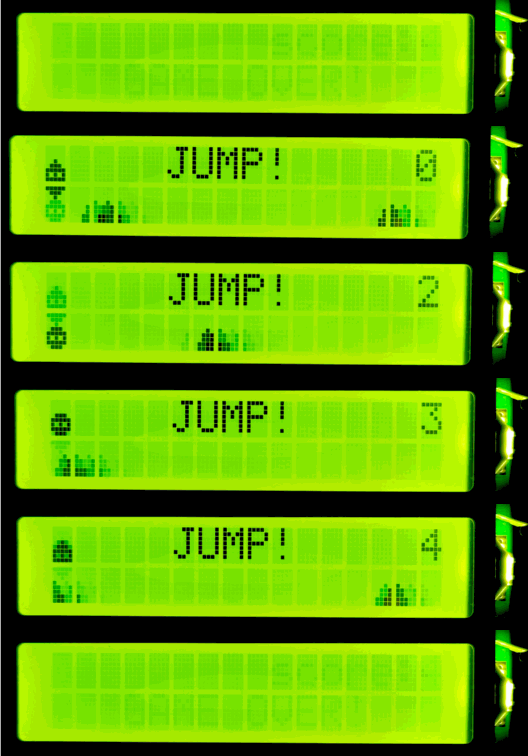



📖 Project Abstract
This project serves as a detailed case study in embedded systems design, porting the mechanics of the famous Chrome T-Rex Runner to the STM32F446xx platform.
Unlike simple loops often found in beginner projects, this implementation transforms a minimalist LCD1602 display into a constrained real-time rendering engine. By leveraging the microcontroller's hardware capabilities—specifically Timer Interrupts for deterministic timing and External Interrupts (EXTI) for low-latency input—we achieve fluid animation and responsive gameplay without blocking the CPU. The core challenge involves optimizing the game's state machine for limited Custom Graphics RAM (CGRAM) resources.
🛠 Hardware Requirements
- Microcontroller: STM32F446xx (e.g., Nucleo-F446RE)
- Display: LCD1602 (16x2 Character LCD)
- Input: Push Button (Connected to PC13)
- Debugger: ST-Link V2/V3
🔩 Hardware Platform: STM32F446xx
The choice of the STM32F446xx is central to this project, offering a powerful core and rich peripheral set ideal for real-time applications.
Key Features
- Core: ARM Cortex-M4 running at up to 180 MHz.
- Memory: 512 KB Flash, 128 KB SRAM.
- Peripherals: Multiple timers, ADCs, DACs, and communication interfaces.
Chip Architecture & Pinout
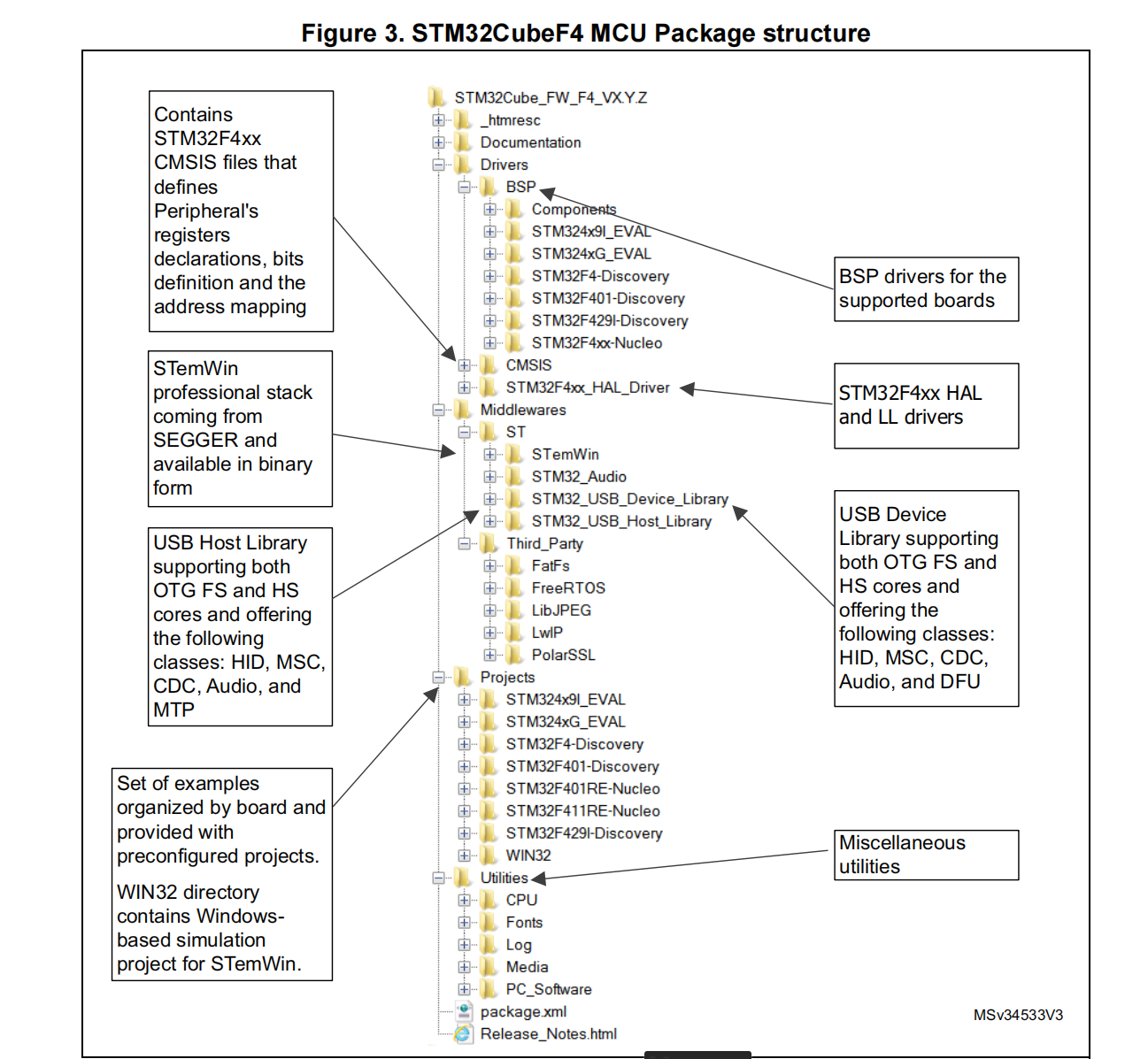
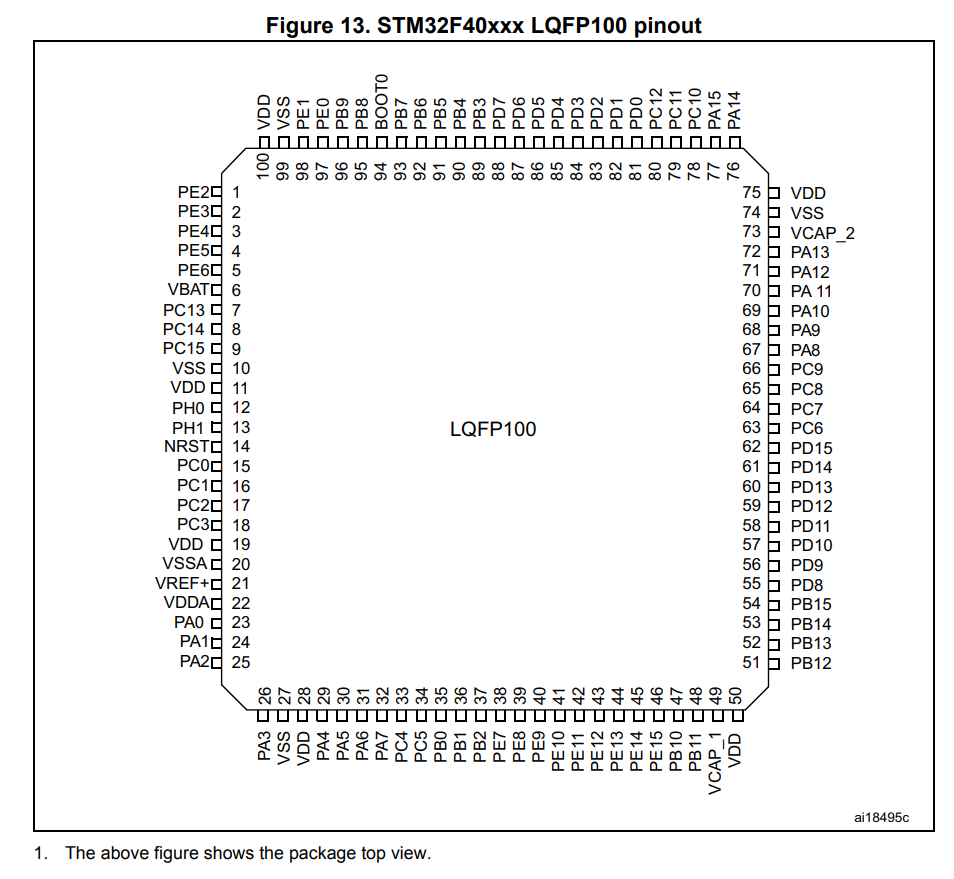
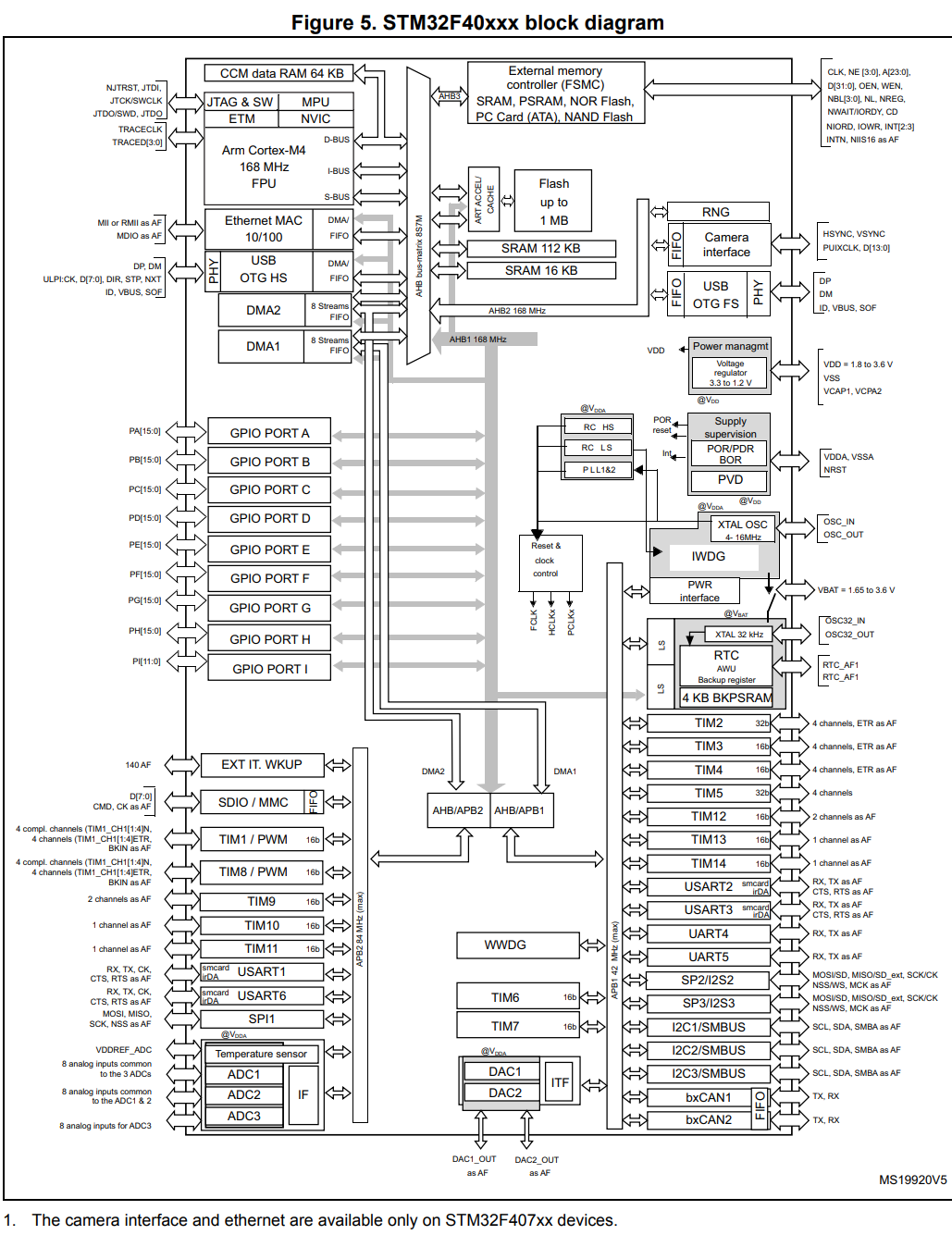
Below are diagrams detailing the architecture and pin definitions of the STM32F446xx, which are crucial for understanding the hardware connections and capabilities.
STM32F4 MCU Package Structure:
Pin Definitions for the Chip:
Chip Data Link Architecture:
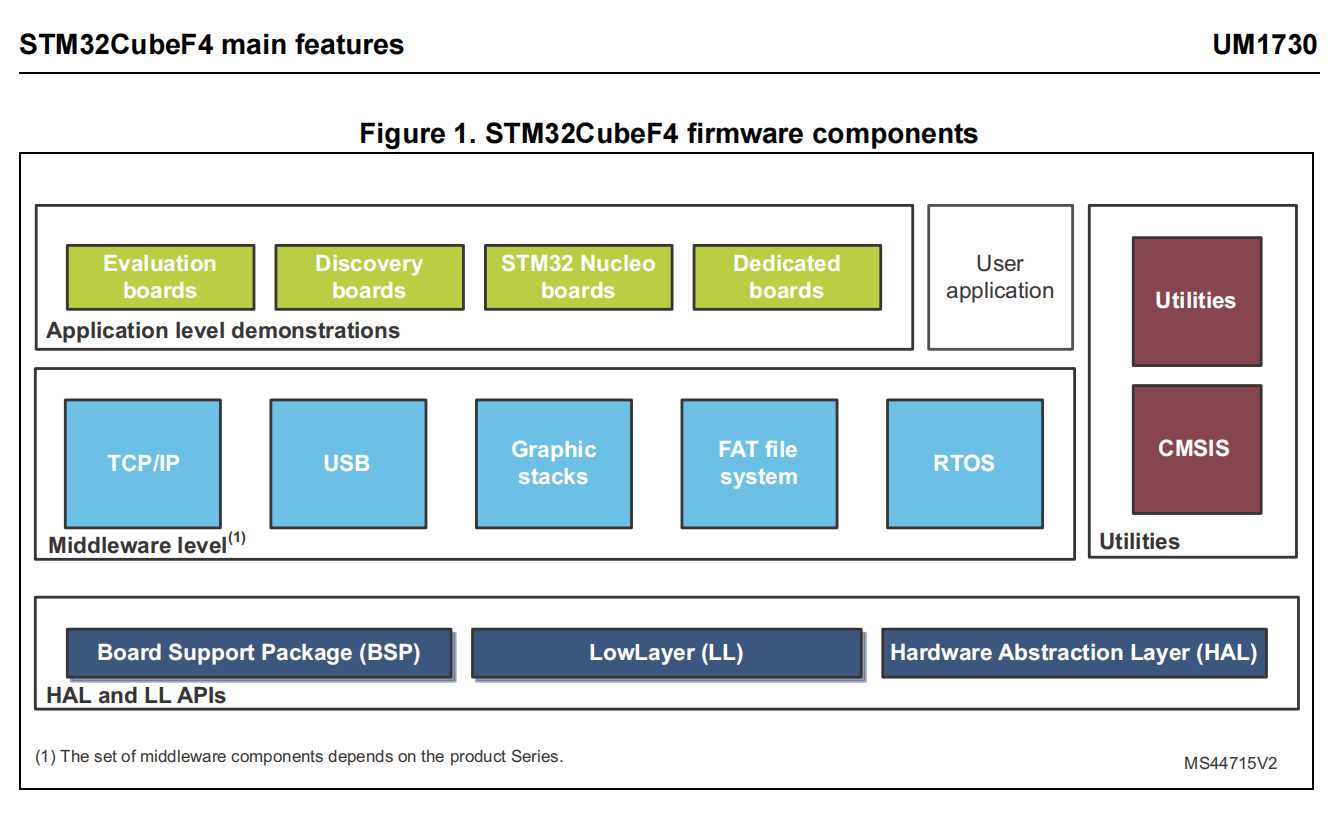
Firmware Components:
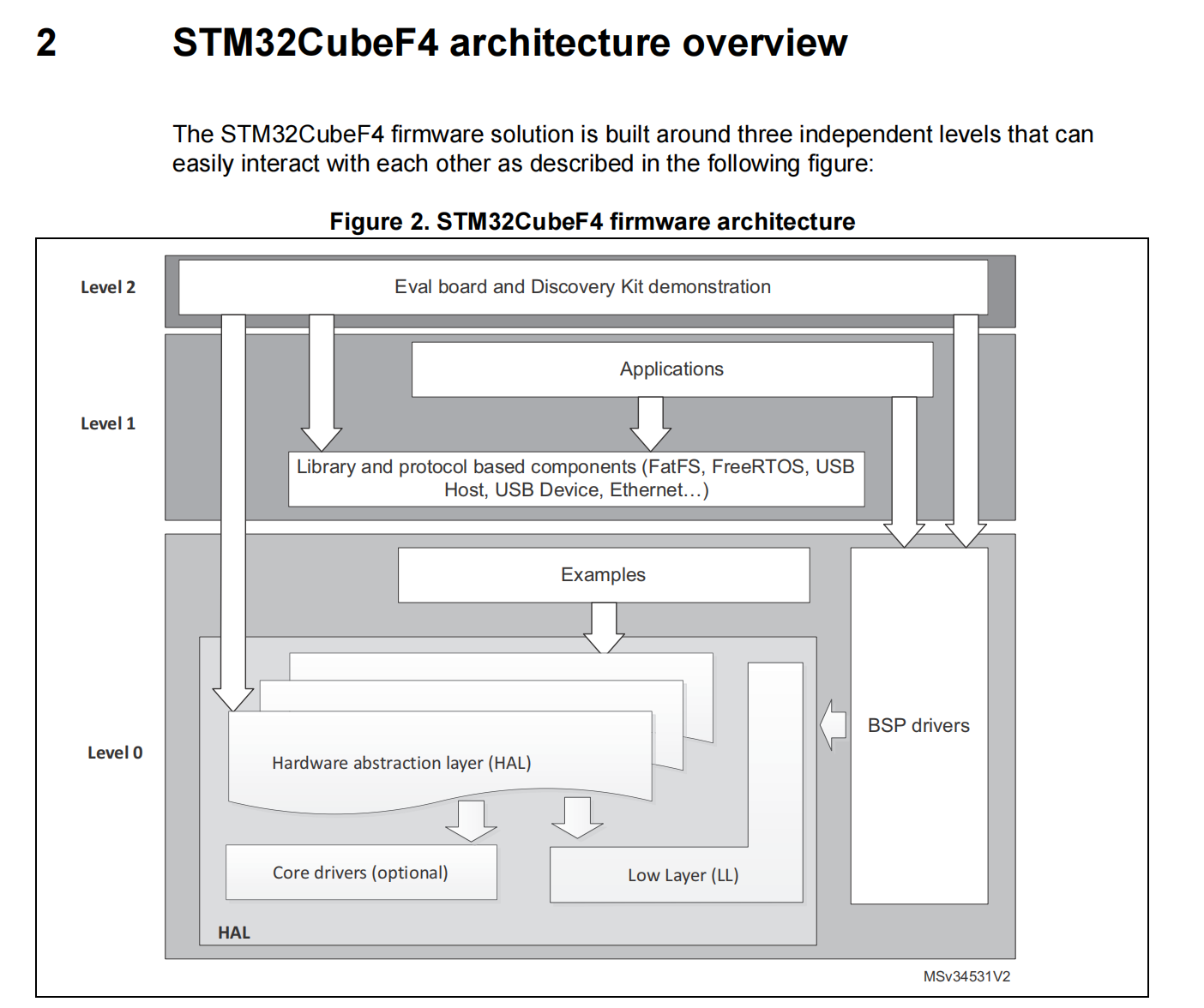
STM32CubeF4 Architecture Overview:
🏗 Architectural Deep Dive
1. Real-Time Constraints & Timing
The game operates as a fixed-rate real-time system. We utilize hardware interrupts to decouple game logic from input handling, ensuring that heavy rendering tasks never delay input detection.
| Parameter | Configuration | Mechanism | C Language Entry Point |
|---|---|---|---|
| Frame Rate | ( interval) | TIM1 Update Interrupt | HAL_TIM_PeriodElapsedCallback() calls Game_Core_Loop() |
| Input Latency | Sub-millisecond | PC13 EXTI Interrupt | HAL_GPIO_EXTI_Callback() sets jump_order flag |
| Synchronization | Global volatile Flags |
Used to communicate input commands between high-priority ISRs and application logic. | extern volatile bool jump_order; |
2. Repository Structure
The project adheres to the standard STM32CubeIDE file structure, keeping hardware abstraction separated from game logic.
├── Core/
│   ├── Inc/
│   │   ├── dinogame.h           // Game state definitions and function prototypes
│   │   ├── lcd.h                // LCD struct and Low-level API declarations
│   │   └── main.h
│   └── Src/
│       ├── dinogame.c           // Core game logic, physics, and collision detection
│       ├── lcd.c                // LCD driver implementation and CGRAM bitmaps
│       ├── main.c               // MCU peripheral setup and main while(1) loop
│       └── stm32f4xx_it.c       // Interrupt Service Routines (TIM1, EXTI)
├── Drivers/                     // STM32 HAL Drivers
├── CMakeLists.txt               // Build configuration
└── STM32F446XX_FLASH.ld         // Linker script
💻 Code Logic and Implementation
1. Game State Machine (GSM)
Located in dinogame.c, the obstacle system mimics the original game's behavior. Visual movement is encoded in a 5-state cyclical transition ( to ) to simulate smooth scrolling on a blocky display.
- Initialization:
Game_Status_Init()resets arrays, ensuringgrass_status[COL]is zeroed. - Propagation: The
Game_Update_Grass()function executes transitions using in-place array modifications. It uses index skipping (e.g.,i = i + 2) to prevent processing the same obstacle twice in one frame.
// Example: Core Grass Logic (dinogame.c)
if (grass_status[i] == 1) {
    if (i == COL - 1) {
        // Handle end of screen
        return;
    } else {
        grass_status[i] = 2;     // Current block transitions state
        grass_status[i + 1] = 4; // Next block prepares to render
        i = i + 2;               // Skip index to prevent double processing
    }
}
// Collision logic follows...
2. Physics & Character Rendering
The character uses a 16-step jump cycle (JUMP_CYCLE = 16). The display_jump_status function maps specific points in this cycle to visual CGRAM frames to achieve animation:
| Jump Status Range | Row 0 (Top) | Row 1 (Bottom) | Visual Effect |
|---|---|---|---|
| Space (' ') | DINO_A / DINO_B |
Running/Standing (Ground) | |
DINO_JUMP_BOTTOM |
DINO_A |
Low Jump (Body Split) | |
DINO_JUMP_TOP |
Space (' ') | Mid-High Jump (Body in Top Row) |
3. Asynchronous Input Handling
To achieve maximum responsiveness, button input is handled entirely in the interrupt context (ISR).
// Example: EXTI Handler (stm32f4xx_it.c)
void HAL_GPIO_EXTI_Callback(uint16_t GPIO_Pin) {
    // ... Debouncing logic ...
    if (game_start == false) {
        game_start = true;
        Lcd_clear(&lcd); // Immediate feedback
    } else {
        jump_order = true; // Signal jump request to the core logic
    }
}
🎨 Graphics Implementation via CGRAM
The visual fidelity is achieved by exploiting the eight available Custom Graphics Character slots (CGRAM) in the HD44780 controller. The Lcd_load_custom_chars() function populates these slots during initialization.
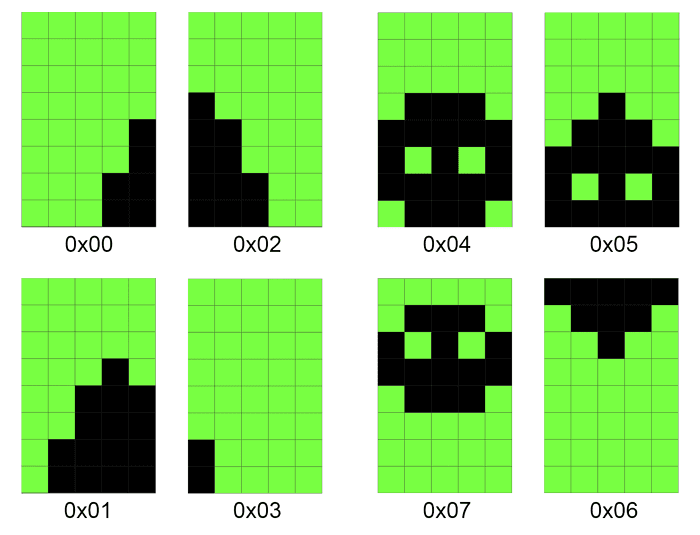
Custom Character Mapping
| CGRAM Address | Macro | Graphic Purpose | Defined In |
|---|---|---|---|
| 0x00 - 0x03 | CHAR_GRASS_F0 - F3 |
Obstacle animation frames (encoded arrays) | lcd.c |
| 0x04 - 0x07 | CHAR_DINO_A - JUMP |
Dino run cycle and jump sequence | lcd.c |
| 🚀 Execution Protocol |
1. Compilation
- Toolchain: Ensure ARM-None-EABI GCC and STM32 HAL libraries are configured.
- Flags:
-mcpu=cortex-m4 -mthumb - Timer Config: Verify
MX_TIM1_Initsettings match the 50 ms target (Prescaler and Period calculated based on APB2 clock).
2. Deployment
- Flash the generated
.elfor.binbinary to the STM32F446xx target using the ST-Link utility or OpenOCD.
3. Controls
- Boot: The system initializes and displays a waiting prompt.
- Start: Press the User Button (PC13) to set
game_start = true. - Play: Press the button to trigger a jump (
jump_order = true). - Score: Survival time is tracked on the top line of the display.
🤝 Acknowledgements & References
This project is inspired by the numerous minimal implementations of the T-Rex Runner across various embedded platforms.
- Original Concept: Google Chrome's "No Internet" Game.
- Logic Reference: The complexity and state machine structure were largely inspired by the Python/Raspberry Pi implementation found here: Chrome Dino Game on LCD1602 (Raspberry Pi).
- Other Implementations & Inspirations:
- Disclaimer: This is an educational project demonstrating embedded real-time logic and is not affiliated with Google.
Current public source: repository document →